Designing Component-Driven Authentication in AEM with Amazon Cognito
In many enterprise systems, core business data already resides in backend platforms such as Amazon RDS on Amazon Web Services.
While these systems serve as the system of record, they are not designed to deliver user-facing experiences or content-driven workflows.
This is where Adobe Experience Manager fits naturally — not as a database or business logic engine, but as the experience layer that interfaces with backend services, orchestrates content, and presents data in a secure, user-friendly way.
Once AEM becomes the primary interface to business data, authentication and access control shift into frontend design concerns that must scale across templates, components, and user journeys.
Cognito as the Source of Identity Truth
Modern applications rely on external identity providers such as Amazon Cognito or ID.me to authenticate users. These providers expose client-side SDKs that handle login, registration, MFA, and session management.
In this model, identity providers delegate authentication to client-side SDKs:
- SDKs run in SPA or AEM frontend
- They authenticate users
- They return: Access token, ID token, Refresh token
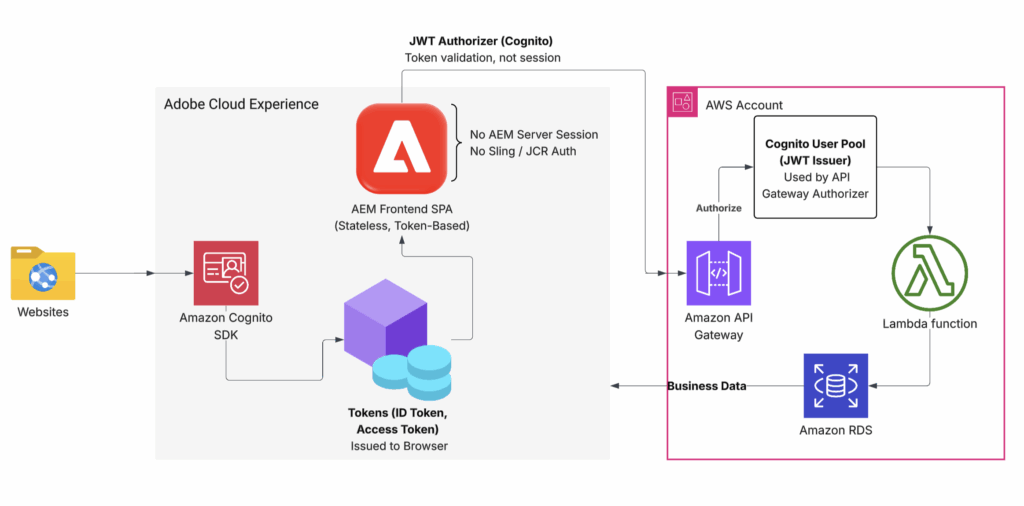
Authentication occurs in browser via identity provider SDK, with tokens remaining client-managed.
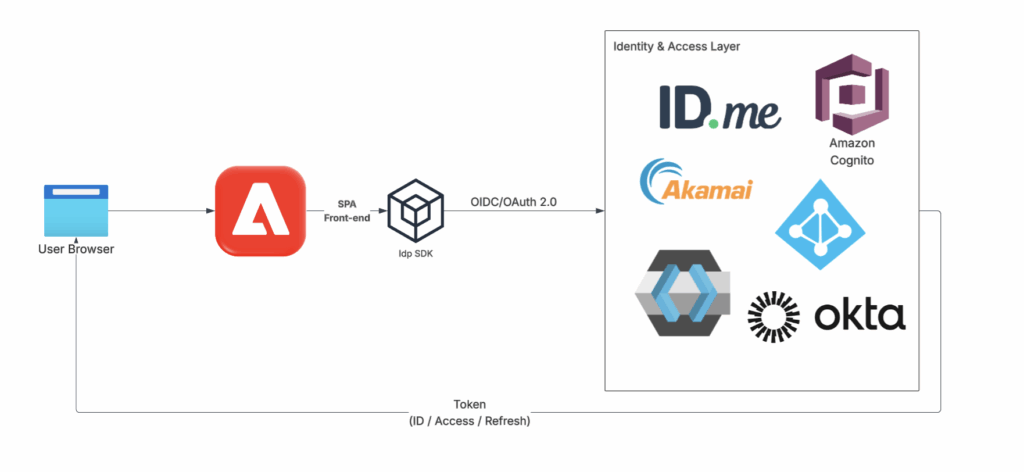
This approach assumes stateless application model, where identity state lives in tokens rather than server sessions. When AEM is used as a frontend layer, native server-side sessions managed by Sling are intentionally not used.
Key point: Access tokens expire quickly, so refresh tokens are used to obtain new access tokens before calling backend services. Backend systems trust the identity provider, not the frontend, and authorize requests by validating access tokens.
The next diagram illustrates how these tokens are validated using API Gateway with JWT authorizer.

On the UI side, methods such as getSession() are used only to check local session validity and refresh tokens when needed.
export function getCognitoSession() {
  return new Promise((resolve, reject) => {
    const cognitoUser = userPool.getCurrentUser();

    if (!cognitoUser) {
      reject("No authenticated user");
      return;
    }

    cognitoUser.getSession((err, session) => {
      if (err) {
        reject(err);
        return;
      }

      if (!session.isValid()) {
        reject("Session is invalid");
        return;
      }

      resolve({
        accessToken: session.getAccessToken().getJwtToken(),
        idToken: session.getIdToken().getJwtToken(),
        refreshToken: session.getRefreshToken().getToken(),
        expiresAt: session.getAccessToken().getExpiration() * 1000
      });
    });
  });
}This logic belongs to Cognito client SDK and exists only to manage authentication state and token freshness—not authorization.
Method behavior:
- Retrieves authenticated Cognito user from browser context
- Checks whether local session remains valid
- Extracts accessToken, idToken, and refreshToken
- Refreshes tokens automatically when expired or near expiration
Cognito remains the source of truth for user identity, acting as the central mapping point between application layer and RDS layer.
User Identity Capture and Profile Propagation
Amazon Cognito acts as a central place to manage user identity. When users register or sign in, the application collects only required information to confirm identity and allow secure access.
Registration can happen step by step, so users can provide details over time instead of completing everything at once. This may include basic identity checks, such as KYC, when needed.
Collected information is stored in Cognito and reused for future sign-ins, so users do not need to repeat the same steps again.
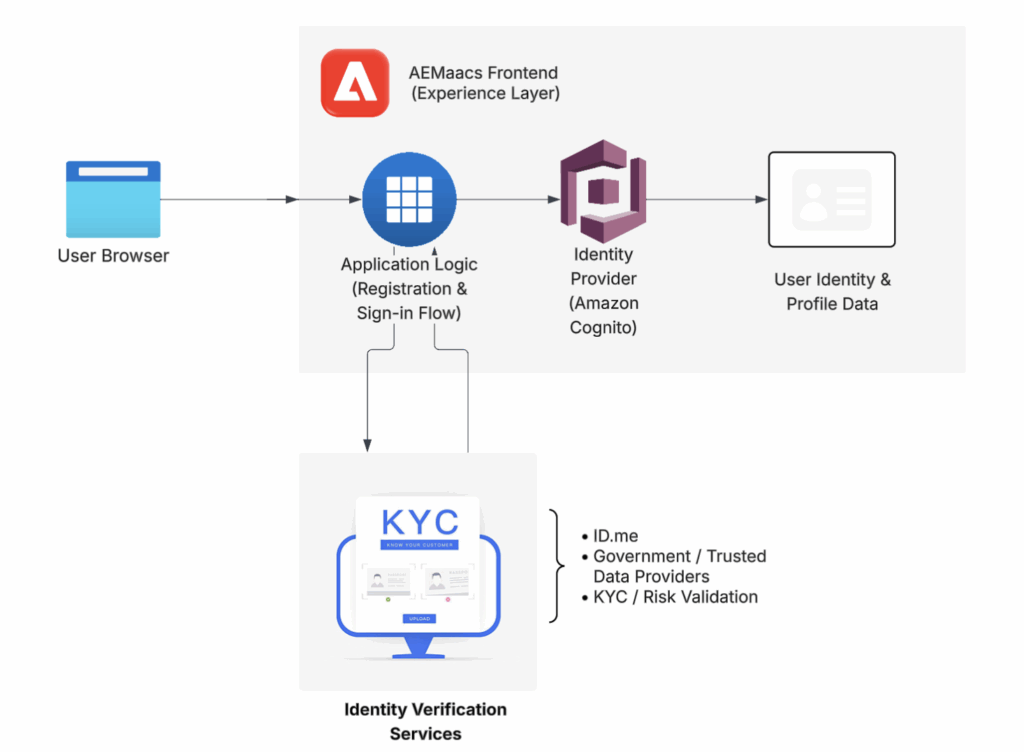
Note: ID.me can act as a source of truth for user identity without being part of the primary authentication flow.
Instead, applications can call secured public APIs (for example, through an API Gateway) to verify identity status before creating or updating user profiles in Amazon Cognito.
Early implementations usually start with Amazon Cognito for login and basic identity needs. When higher assurance is required, ID.me can be added for stronger identity verification.
OIDC or SAML are then used to improve authentication and authorization.
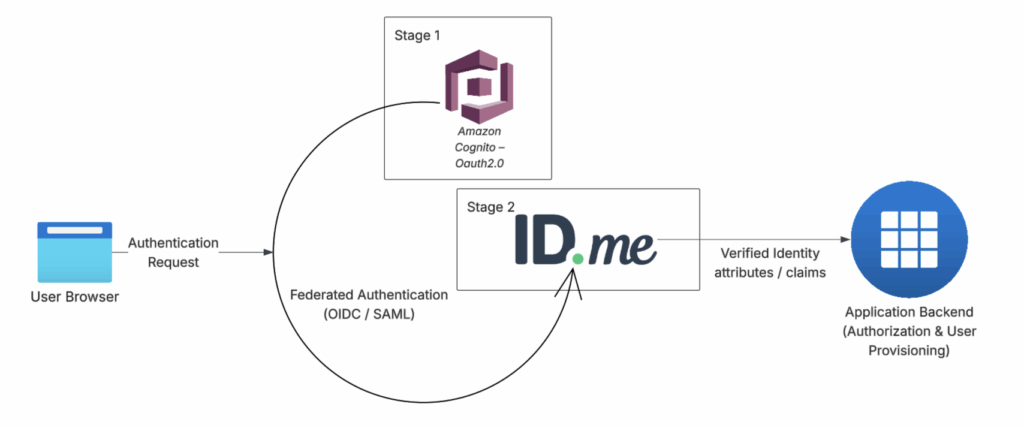
In practice, identity logic follows one of two execution paths, depending on where control and observability are required.
- Application → REST APIs → AWS services, where the application presents access tokens and backend services validate and authorize requests.
- Application → Cognito → Lambda Triggers → AWS services, where identity lifecycle events are intercepted and extended by server-side triggers.
First approach centralizes behavior around well-defined APIs. Requests can be inspected, replayed, and debugged using standard tools such as API logs or Postman, making system behavior more observable and predictable.
Second approach introduces additional control at identity lifecycle level, while distributing logic across multiple Lambda triggers. Debugging often requires tracing execution across trigger points, CloudWatch logs, and asynchronous flows, increasing operational complexity.
Template-Based Authentication in AEM
Applying this model to AEM, Amazon Cognito integrates directly into the AEM frontend (SPA) using the ui.frontend module and clear separation of concerns.
The frontend integration supports the following authentication capabilities:
- Login with multiple MFA options:
- SMS
- Voice or landline (via AWS Connect)
- Authenticator applications
- User Registration Flow
Once authentication is completed on the frontend, the logic is encapsulated into reusable AEM frontend components. These components are applied at the template level, allowing pages such as Login and Dashboard to inherit consistent authentication structure and behavior through their respective templates, as illustrated in the diagram.
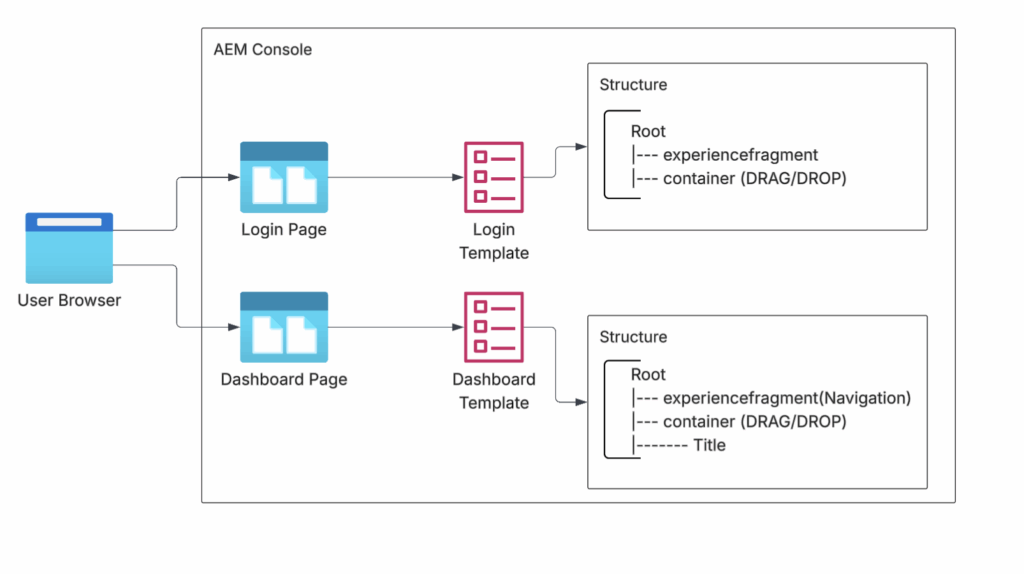
This pattern allows authentication checks to be centralized, predictable, and reusable across all secured pages without duplicating logic in individual components.
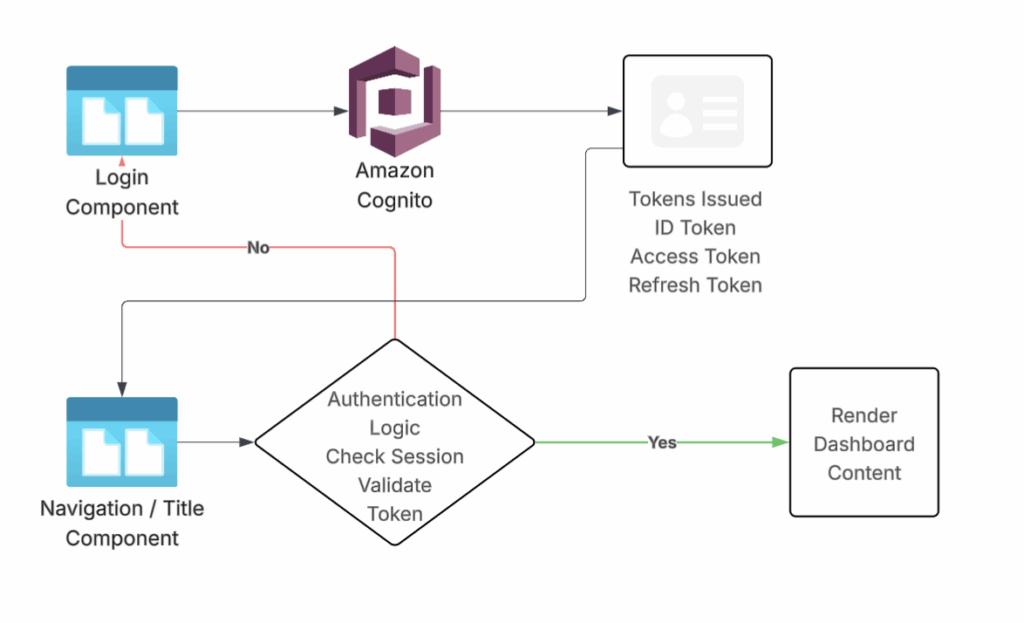
Before Amazon Cognito can authenticate a user, the user must first be registered in the Cognito User Pool. This happens when the user initiates signup from the application using the Cognito client SDK.
During registration, the application can submit both standard attributes (such as email) and business-specific custom attributes.
Custom attributes must be defined in the User Pool and granted appropriate read/write permissions to the application client.
These attributes are stored in Cognito and become part of the user’s identity record, allowing Cognito to authenticate the user and issue tokens in subsequent sign-ins.
import { CognitoUserAttribute } from 'amazon-cognito-identity-js';

const attributes = [
  new CognitoUserAttribute({ Name: 'email', Value: user.email }),
  new CognitoUserAttribute({ Name: 'custom:businessId', Value: user.businessId }),
  new CognitoUserAttribute({ Name: 'custom:status', Value: user.status })
];

userPool.signUp(
  user.email,
  user.password,
  attributes,
  [],
  (err, result) => {
    if (err) {
      console.error('Signup failed:', err.message);
      return;
    }

    console.log('User registered:', result?.user.getUsername());
  }
);Once a user is registered and authenticated, verified identity attributes can be safely referenced to derive frontend context.
These attributes are not used to make authorization decisions, but to derive a lightweight identity context that supports frontend rendering and business workflows.
Lightweight Identity Context in the AEM Frontend
After authentication and token validation, frontend derives lightweight identity context once and exposes it across page and components.
In AEM setup, this typically works as follows:
- Authentication logic executes at the template or application shell level
- Verified identity attributes are read from Cognito tokens or backend responses
- Selected non-sensitive values are stored in short-lived cookies
- Components read these values to control UI behavior such as navigation, labels, or conditional visibility
This approach keeps components stateless and reusable while avoiding repeated token parsing or duplicated authentication checks.
export const AUTH_ACCESS_TOKEN_COOKIE = 'auth_access_token';
export const USER_ID_KEY = 'user_id';
export const USER_STATUS_KEY = 'user_status';
export const USER_FULL_NAME_KEY = 'user_full_name';
...These values:
- Help frontend and AEM render UI consistently
- Do not grant access to APIs
- Do not replace token validation
With frontend context established, backend services continue to validate access tokens on every request and make all authorization decisions.
Example: frontend writes derived UI context after authentication
setCookie(name: string, value: string, durationMs?: number): void {
  if (durationMs) {
    const expires = new Date(Date.now() + durationMs).toUTCString();
    document.cookie = `${name}=${value}; expires=${expires}; path=/`;
  } else {
    document.cookie = `${name}=${value}; path=/`;
  }
}

// example usage after authentication
setCookie('user_id', userId);
setCookie('user_status', userStatus);
setCookie('user_full_name', fullName);Example: AEM reads derived UI context from incoming requests
public static String getCookieValue(SlingHttpServletRequest request, String cookieName) {
    Cookie[] cookies = request.getCookies();
    if (cookies != null) {
        for (Cookie cookie : cookies) {
            if (cookieName.equals(cookie.getName())) {
                return cookie.getValue();
            }
        }
    }
    return StringUtils.EMPTY;
}For protected pages, login state is checked in the frontend using SDK methods like getSession(), usually within shared components such as navigation.
Backend Authorization with API Gateway and Cognito
Once authentication state is established in frontend, access to protected backend resources is controlled entirely through access token validation. Frontend attaches Cognito-issued access tokens to API requests, and API Gateway authorizes each request before it reaches backend services.
Access tokens are short-lived. When an access token expires, frontend handles the outcome through Cognito SDK methods such as getSession(). Two possible flows exist:
- Force reauthentication
If token refresh fails or session is no longer valid, user is redirected to login. - Silent token refresh
If a valid refresh token exists, Cognito SDK retrieves a new access token and request continues without user interruption.
Backend remains stateless and does not refresh tokens or manage sessions. Authorization decisions are made only by validating access tokens on each request.

In practice, access tokens are required only when requests originate from a client-facing application such as an SPA. In this case, the frontend must attach the Cognito-issued access token so API Gateway can authorize each request.
When API calls are made server-side from AEM (for example, via Sling services), an API key or trusted AWS integration is often sufficient. In this model, AWS already trusts the AEM backend, so an additional JWT authorizer layer is not required.
In short:
- SPA → API Gateway
Access token is required and validated by a JWT authorizer. - AEM backend → API Gateway
API key or trusted AWS credentials can be used without exposing user tokens.
This separation keeps user tokens confined to the frontend while allowing backend services to communicate securely using infrastructure-level trust.
In terms of token control, the lifetime of access tokens, ID tokens, and refresh tokens is configured at the App Client level in Amazon Cognito. These settings are managed directly in the AWS Management Console, allowing teams to define how long tokens remain valid and how sessions are refreshed, as shown below.
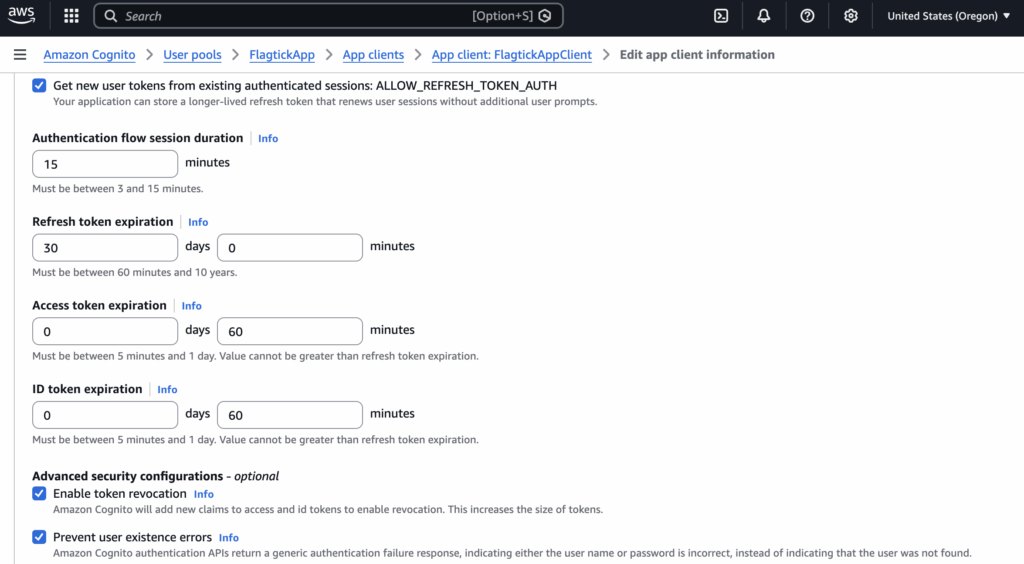
One limitation of frontend-managed authentication becomes apparent during long-running login flows.
With OAuth 2.0 and Amazon Cognito, login happens through a redirect to the identity provider. The application waits for the user to finish authentication before control returns to the application.
In practice, this step can take longer than expected—especially with MFA methods like SMS, authenticator apps, or voice calls. If the user takes too long, short-lived frontend cookies or transient session state may expire before the redirect completes.
In that case, authentication succeeds at Cognito, but the user returns to the application with an expired frontend session.
Wrapping Up
This article explored a frontend-first authentication model using Amazon Cognito with Adobe Experience Manager as the experience layer.
Authentication is handled in the browser through Cognito SDKs, while authorization is enforced by backend services using short-lived access tokens and API Gateway validation. AEM remains stateless, avoids server-side sessions, and focuses on UI composition rather than identity management.
By applying authentication logic at the template or application shell level, access behavior stays consistent across pages while keeping authorization centralized and secure.
What’s Next
OAuth 2.0 works well for fast, interactive login flows, but it introduces challenges when authentication takes longer than expected. During an OAuth redirect, the application temporarily hands control to the identity provider and relies on short-lived frontend state while waiting for the user to return.
In real-world scenarios—especially with MFA methods such as SMS, authenticator apps, or voice and landline calls—the authentication step may take several minutes. If frontend cookies or transient state expire during this time, the user can successfully authenticate at the identity provider but return to the application with an expired session, resulting in failed access or authorization errors.
In these cases, SAML 2.0 can be a better fit. SAML-based flows rely on server-managed sessions rather than frontend state, making them more resilient to long or variable authentication steps. This approach is often preferred for high-assurance identity providers such as ID.me, particularly in regulated or member-based portals built on Adobe Experience Manager.
This limitation—and how SAML addresses it—is explored in follow-up article:
Integrating ID.me SAML 2.0 with AEM as a Cloud Service