Implementing ID.me OpenID Connect (OIDC) with AEM as a Cloud Service
This guide shows how to integrate ID.me as an OpenID Connect (OIDC) Identity Provider with AEM as a Cloud Service (AEMaaCS).
After completing this setup, AEM will:
- Redirect users to ID.me for authentication
- Exchange authorization codes for ID and access tokens
- Retrieve verified user claims from ID.me
- Create authenticated AEM sessions
- Return users to the protected content they originally requested
The sections below walk through prerequisites, OIDC configuration, and verification steps in the exact order AEM executes the login flow.
Reference:
🔗 AEM CS – OIDC Authentication Handler
https://experienceleague.adobe.com/en/docs/experience-manager-cloud-service/content/security/open-id-connect-support-for-aem-as-a-cloud-service-on-publish-tier
🔗 ID.me – OpenID Connect Overview (endpoints, scopes, parameters)
https://docs.id.me/guides/open-id-connect/overview
Overview, Prerequisites & ID.me OIDC Flow
AEM as a Cloud Service provides native OpenID Connect (OIDC) authentication support on the Publish tier.
This allows AEM to delegate authentication to an external Identity Provider such as ID.me, without implementing custom OAuth logic or handling tokens in application code.
In this model:
- ID.me performs identity verification and authentication
- AEM creates authenticated sessions and enforces authorization
- Standard OIDC Authorization Code flow is used end to end
While ID.me handles identity verification, AEM remains fully responsible for sessions, permissions, and content protection.
Before configuring OIDC in AEM, ensure the following are available:
- ID.me OIDC application (client ID and client secret)
- AEM Publish instance with HTTPS enabled
- At least one protected content path (for example:
/content/<site>) - Redirect URIs registered in the ID.me application
- Required OIDC scopes approved by ID.me
HTTPS is required for ID.me production. Local HTTP (4503) testing is supported only in Sandbox when the redirect URI is explicitly allowed in the ID.me Developer Portal.
Redirect URIs are central to the OIDC callback flow and must exactly match how AEM completes authentication.
- Local (SDK, HTTP): http://localhost:4503/content/<site>/j_security_check
- Local (SDK, HTTPS): https://localhost:8443/content/<site>/j_security_check
- Cloud (Publish): https://<publish-domain>/content/<site>/j_security_check
Important rules:
/j_security_checkis OIDC callback endpoint used by AEM- Callback path must resolve to valid content context (not 404)
- Do not append
.htmlor point to page that returns 404 - Root (
/) redirects are useful only for manual testing, not OIDC handlers - Protocol, host, and path must match exactly
Incorrect callback paths allow ID.me authentication to succeed but prevent AEM session creation.
At minimum, ID.me requires:
openid
http://idmanagement.gov/ns/assurance/ial/2/aal/2These scopes ensure authenticated identity claims at the required assurance level.
OIDC application settings are managed in the ID.me Developer Portal:
https://developers.idmelabs.comUse Sandbox for development and testing before production rollout. Changes to redirect URIs, scopes, or assurance levels require coordination with the organization account owner.
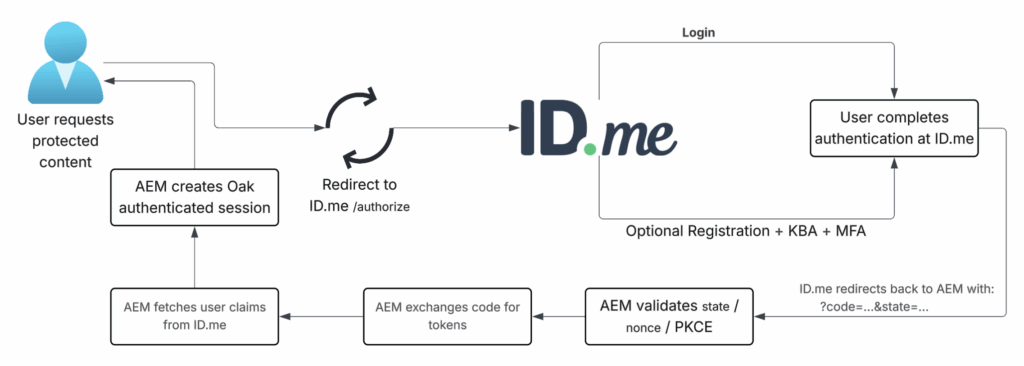
The diagram below shows the end-to-end ID.me OIDC login flow as executed by AEM.
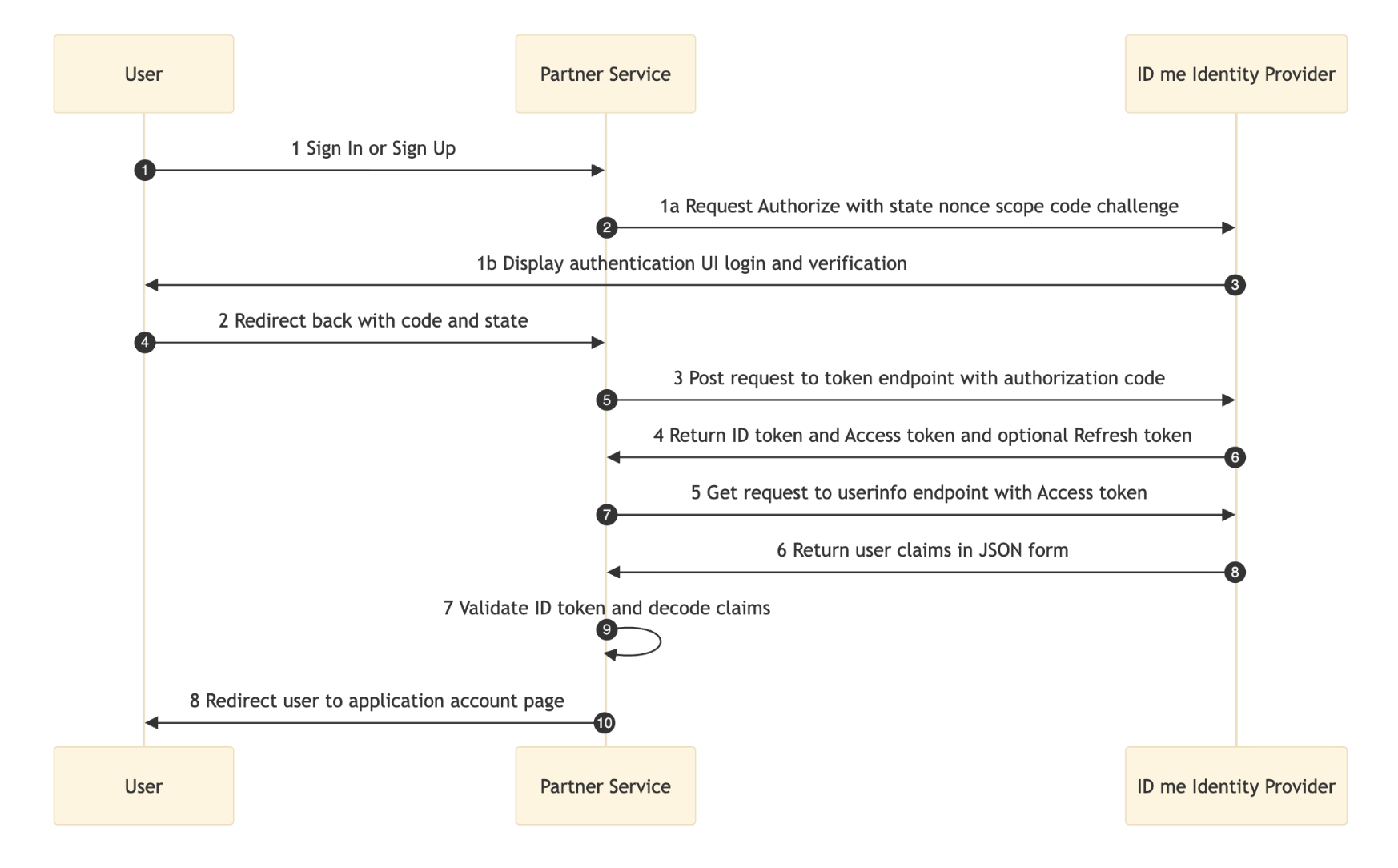
Behind scenes, AEM executes standard OpenID Connect Authorization Code flow with ID.me.
OAuth and API interactions run internally in AEM, without application code involvement.
Sequence below maps diagram to protocol steps.
Authorization request redirects browser to ID.me to initiate authentication.
GET /oauth/authorizeAuthorization callback redirects browser back to AEM after successful login.
/content/<site>/j_security_check?code=…&state=…Token exchange exchanges authorization code for tokens.
POST /oauth/tokenUser info retrieval fetches verified identity claims.
GET https://api.idmelabs.com/api/public/v3/userinfoSession creation creates authenticated AEM session using Oak login tokens.
Logout clears local session and optionally redirects to ID.me logout endpoint.
GET /oauth/logoutThese steps are shown for understanding only. Configuration, not custom code, controls this flow in AEM.
AEM OIDC Configuration — Required OSGi Files
Configuration below defines complete OIDC integration surface for ID.me. Each OSGi file participates in same authentication flow and must be deployed together for successful login.
OIDC connection configuration establishes ID.me as identity provider and enables automatic endpoint discovery through published metadata.
org.apache.sling.auth.oauth_client.impl.OidcConnectionImpl~idme.jsonExample:
{
  "name": "idme",
  "baseUrl": "https://api.idmelabs.com/oidc",
  "clientId": "$[env:IDP_CLIENT_ID]",
  "clientSecret": "$[secret:IDP_CLIENT_SECRET]",
  "scopes": [
    "openid",
    "http://idmanagement.gov/ns/assurance/ial/2/aal/2"
  ]
}OIDC metadata discovery resolves authorization, token, userinfo, and JWKS endpoints dynamically using:
https://api.idmelabs.com/oidc/.well-known/openid-configurationWith identity provider defined, authentication entry point must now be registered to trigger OIDC flow for protected content.
org.apache.sling.auth.oauth_client.impl.OidcAuthenticationHandler~idme.cfg.jsonExample:
{
  "callbackUri": "https://<domain>/content/<site>/j_security_check",
  "path": [
    "/content/<site>"
  ],
  "idp": "idme-idp",
  "defaultConnectionName": "idme",
  "pkceEnabled": false,
  "userInfoEnabled": false
}Notes:
callbackUrimust exactly match redirect URI registered in ID.mepathdefines protected site content- Never protect
/on Publish; system and Granite endpoints rely on unauthenticated access.
⚠️ Risk without PKCE: Authorization code interception (browser extensions, network interception, redirect leaks, logs) allows token reuse.
If error occurs:
error=invalid_pkce_challenge
error_description=The PKCE challenge value is requiredAfter authorization code exchange completes, identity claims returned by ID.me must be processed and mapped into authentication context.
org.apache.sling.auth.oauth_client.impl.SlingUserInfoProcessor~idme.cfg.jsonExample:
{
  "connection": "idme"
}Custom user info processor applies when ID.me-specific claims or extended attribute handling is required.
ui.config/src/main/content/jcr_root/apps/<project>/osgiconfig/config.publish/
com.<project>.core.services.IDPUserInfoProcessor~idme.cfg.jsonExample:
{
  "connection": "idme",
  "userInfoEndpoint": "https://api.idmelabs.com/api/public/v3/userinfo",
  "storeAccessToken": false,
  "idpNameInPrincipals": false
}When using custom processor:
- Remove default
SlingUserInfoProcessor~idme - Keep single processor per connection
- Use service ranking to ensure deterministic execution
Example registration:
@Component(
  service = OidcUserInfoProcessor.class,
  property = {
    OidcUserInfoProcessor.CONNECTION + "=idme",
    Constants.SERVICE_RANKING + ":Integer=200"
  }
)
public class IDPUserInfoProcessor implements OidcUserInfoProcessor {

  @Override
  public void processUserInfo(
      OidcAuthCredentials credentials,
      Map<String, Object> userInfo) {

    mapIfPresent(userInfo, "email", credentials);
    mapIfPresent(userInfo, "given_name", credentials);
    mapIfPresent(userInfo, "family_name", credentials);
    mapIfPresent(userInfo, "sub", credentials);
    mapIfPresent(userInfo, "uuid", credentials);
    mapIfPresent(userInfo, "phone", credentials);
    mapIfPresent(userInfo, "birth_date", credentials);
  }
}Next stage bridges OIDC authentication into Oak external identity framework.
org.apache.jackrabbit.oak.spi.security.authentication.external.impl.ExternalLoginModuleFactory~idme.jsonExample:
{
  "sync.handlerName": "idme",
  "idp.name": "idme-idp"
}Final stage controls synchronization of ID.me users, groups, and attributes into AEM repository.
org.apache.jackrabbit.oak.spi.security.authentication.external.impl.DefaultSyncHandler~idme.jsonExample:
{
  "user.expirationTime": "1s",
  "user.membershipExpTime": "1s",
  "group.expirationTime": "1s",
  "user.propertyMapping": [
    "profile/given_name=profile/given_name",
    "profile/family_name=profile/family_name",
    ...
  ],
  "user.pathPrefix": "idme",
  "group.pathPrefix": "idme",
  "user.dynamicMembership": "true",
  "user.enforceDynamicMembership": "true",
  "group.dynamicGroups": "true",
  "user.autoMembership": ["idp-users"],
  "handler.name": "idme"
}Notes:
user.autoMembershipassigns ID.me users toidp-users- Expiration values control external attribute refresh frequency
- No ID.me tokens are persisted or reused
What expirationTime / ExpTime: “1s” means
- First login
- User node is created immediately
- Profile data is written immediately
- Groups and memberships are synced
- After first login
- User data is considered valid for 1 second
- Next login after 1 second
- AEM calls ID.me again
- User attributes are re-synced
- Group memberships are re-evaluated
- Profile node is updated only if values changed
What user.propertyMapping does and how it works — see diagram below

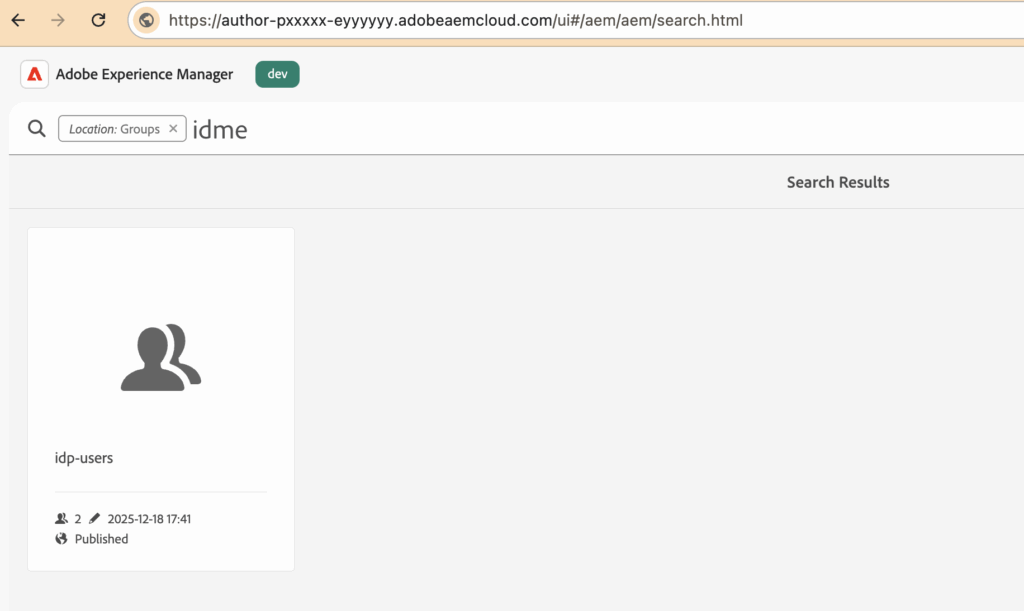
What "user.autoMembership": ["idp-users"] does
- Every user authenticated via ID.me is automatically added to the
idp-usersgroup - Group assignment happens during external identity sync
- Users do not need to be manually added
For example (created group into Cloud)
Authorization rules for synchronized identities are applied during deployment using RepoInit.
Configuration file:
org.apache.sling.jcr.repoinit.RepositoryInitializer~idme.acl.cfg.jsonExample:
{
  "scripts": [
    "create group idp-users",
    "set ACL for idp-users",
    "  allow jcr:read on /content/flagtick",
    "end"
  ]
}RepoInit configuration applies group-based authorization to identities authenticated through ID.me.
- Ensures the
idp-usersgroup exists - Grants read access to
/content/flagtick - Allows all ID.me–authenticated users to access protected content through group privileges
Local environments expose synchronized users and groups through User Admin console.
http://localhost:4503/useradminImpersonation confirms authorization rules applied during identity synchronization.
/content/flagtick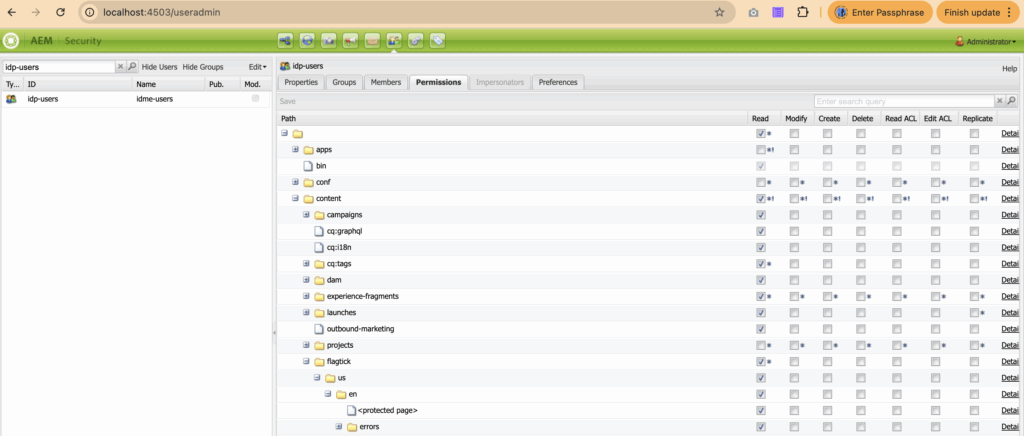
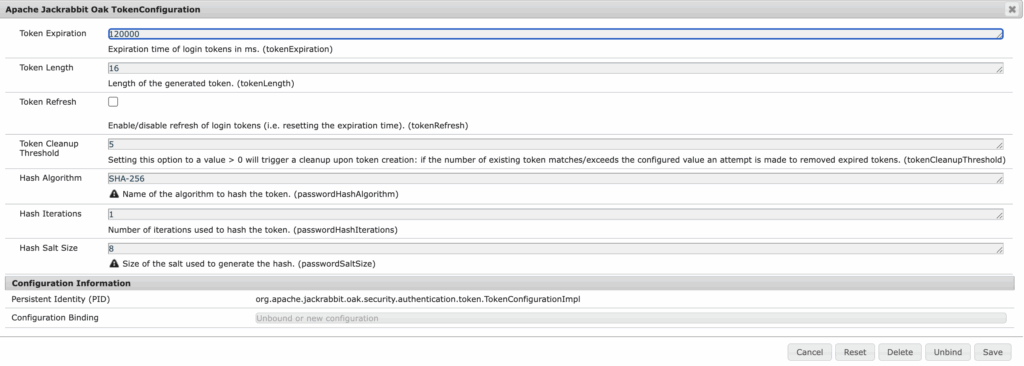
After authentication completes, Oak login token is created to maintain authenticated session.
/home/users/idme/<user-id>/.tokens/<token-id>Oak login token lifecycle is controlled entirely by Oak configuration, independent of ID.me or OIDC tokens.
org.apache.jackrabbit.oak.security.authentication.token.TokenConfigurationImpl.config.jsonExample:
{
  "tokenExpiration": 3600000
}tokenExpirationmeasured in seconds3600equals 1-hour AEM session- Applies to all authentication mechanisms, including OIDC
Repository view below shows Oak-managed login token persisted during authenticated session.
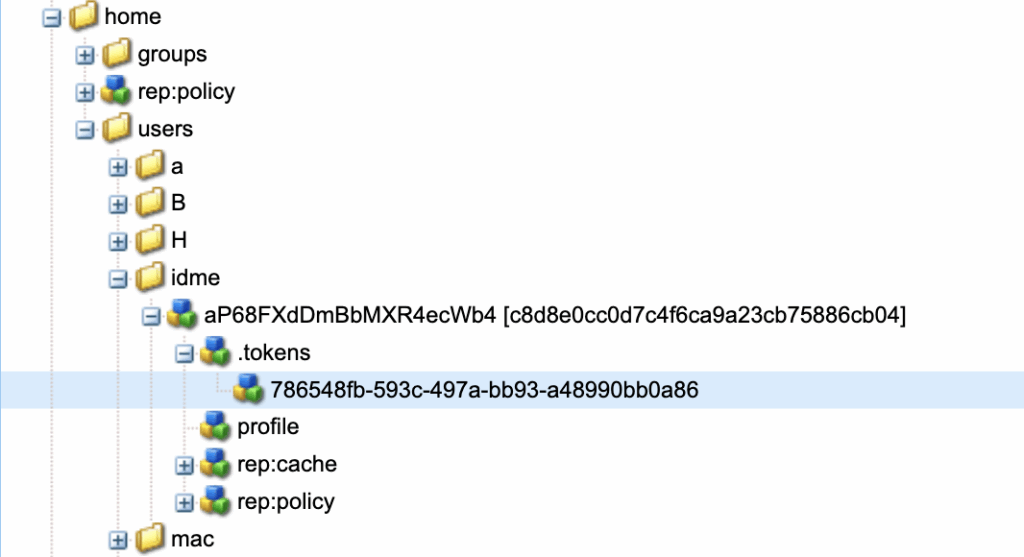
Session behavior changes apply at Oak layer and affect all authentication mechanisms. AEM SDK or on-premise environments allow updates through Oak TokenConfiguration console. AEM as Cloud Service requires OSGi configuration with Adobe environment variables. Token values use milliseconds.
Because configuration applies globally, system and Granite paths must be explicitly excluded. OIDC should protect only site content; misconfiguration can cause login loops or block Felix Console access.
{
  "auth.anonymous": false,
  "sling.auth.requirements": [
    "+/content/<site>",
    "-/content/<site>/us/en/login",

    "-/content/dam",

    "-/etc.clientlibs",
    "-/etc.clientlibs/*",

    "-/libs/granite",
    "-/libs/granite/*",
    "-/libs/granite/ui",
    "-/libs/granite/ui/*",
    "-/libs/granite/core",
    "-/libs/granite/core/*",

    "-/libs/granite/oauth/content/authorization",
    "-/system/sling/login"
  ]
}Do not enable page-level authentication when using OIDC. Sling handles authentication at path level; page properties are not part of this flow and may trigger SlingAuthenticator doLogin errors or double login attempts.
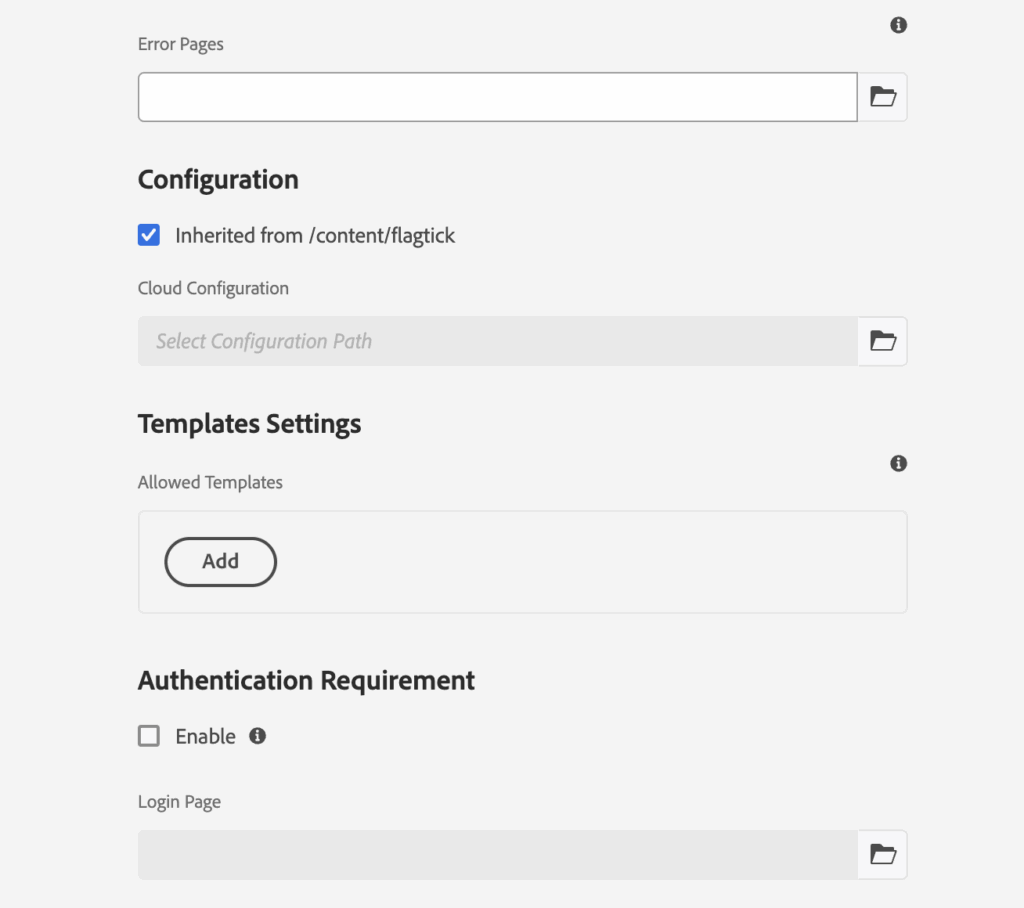
Or leave jcr:mixinTypes empty for pages under protected content paths.
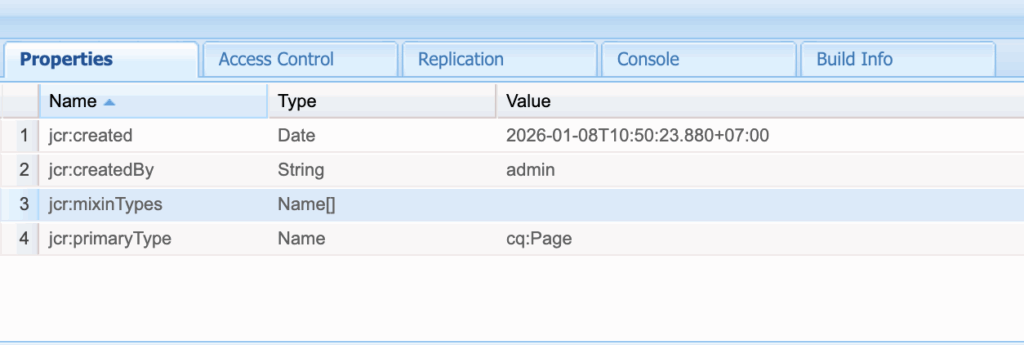
With page-level auth disabled, OIDC is enforced only through Sling protected paths. Next, Dispatcher must allow OIDC endpoints to pass through.
Dispatcher, Proxy & ReferrerFilter Rules
After OIDC authentication succeeds at ID.me, the browser returns to AEM via the OIDC callback endpoint.
For that callback to succeed, certain authentication endpoints must bypass Dispatcher and reach Publish directly.
When these endpoints are not allowed, the user completes login at ID.me but receives a 404 response from AEM because the callback never reaches the authentication handler.
Example callback:
/content/<site>/**/j_security_check?state=…&code=…In OIDC flow, this callback is critical — it carries the authorization code needed for token exchange and session creation in Oak. Because j_security_check is a system authentication endpoint, it must be explicitly allowed in filters.any:
# --- OIDC Authentication Endpoints (ID.me integration) ---
/0401 { /type "allow" /url "/content/<site>/**/j_security_check" }
/0403 { /type "allow" /url "/system/sling/login" }
/0404 { /type "allow" /url "/system/sling/logout" }Dispatcher must also allow logout to reach /system/sling/logout. Logout clears the Oak authentication token and optionally redirects to a post-logout page:
/system/sling/logout?resource=<post-logout-page>If ID.me integration involves user-agent XHR or front-channel requests from ID.me-origin pages back into AEM, CORS may be required:
com.adobe.granite.cors.impl.CORSPolicyImpl~idme.jsonFor example:
{
  "alloworigin": ["https://api.idmelabs.com"],
  "allowedpaths": [".*/j_security_check"],
  "supportedmethods": ["POST","GET"]
}During development, CORS may be relaxed:
{
  "alloworigin": ["*"],
  "allowedpaths": ["^.*$"],
  "supportedmethods": ["*"]
}With Dispatcher, logout, and (optional) CORS rules in place, the ID.me OIDC callback can successfully reach the Publish tier and create a session. The next step is to verify that OIDC support is present and active within AEM.
Verifying OIDC Availability — Bundles vs Components
Before wiring ID.me into authentication flow, verify that OIDC support is installed and running in AEM. Two consoles provide complete visibility into this:
Bundles→ confirms OIDC code availabilityComponents→ confirms OIDC services running
Both must be healthy for login flow to succeed.
Search for bundles including:
com.adobe.granite.auth.oidc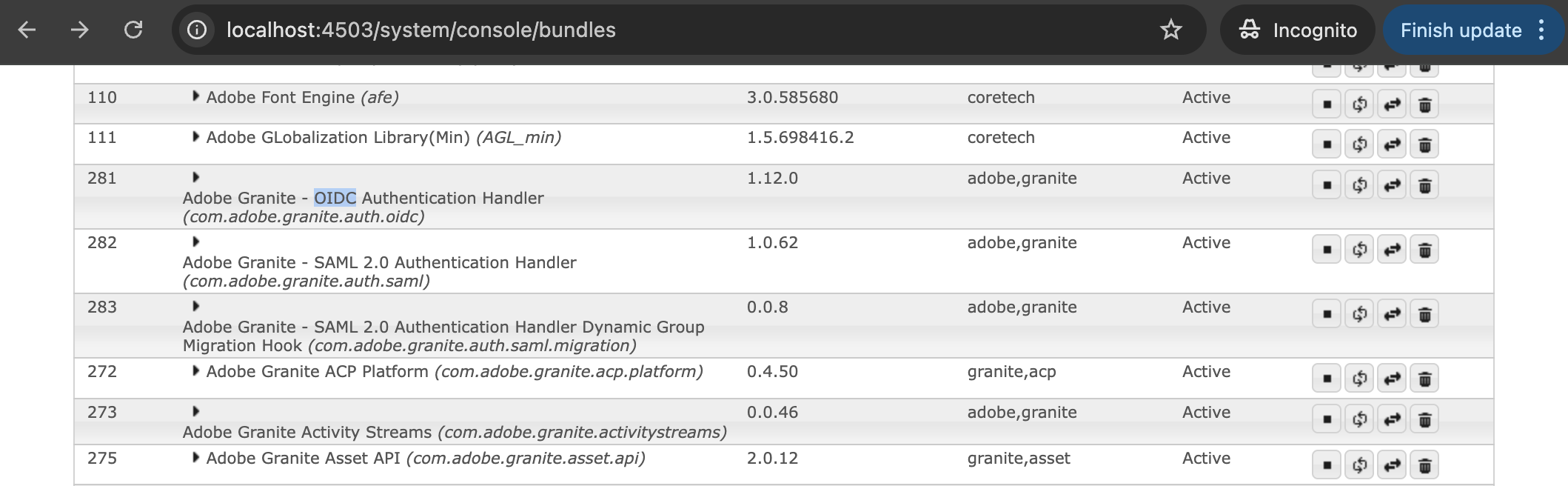
Active bundles confirm OIDC feature is installed. Missing bundles indicate unsupported environment.
Then open:
/system/console/componentsValidate that services such as:
OidcConnectionImplOidcAuthenticationHandlerSlingUserInfoProcessorImplor IDPuserInfoProcessorExternalLoginModuleFactory
If deeper inspection is required during development, enable dedicated OIDC debug logging:
ui.config/src/main/content/jcr_root/apps/<site>/osgiconfig/<runmode>/org.apache.sling.commons.log.LogManager.factory.config~<site>.cfg.jsonFor example:
{
  "org.apache.sling.commons.log.names": [
    "com.flagtick.core.services",
    "org.apache.sling.auth.oauth_client.impl.OidcAuthenticationHandler",
    "org.apache.sling.auth.oauth_client.impl.SlingUserInfoProcessorImpl",
    "org.apache.jackrabbit.oak.spi.security.authentication.external.impl.ExternalLoginModule",
    "org.apache.sling.auth.oauth_client.impl.OidcAuthenticationHandler",
    "org.apache.jackrabbit.oak.spi.security.authentication.external.impl.DefaultSyncHandler"
  ],
  "org.apache.sling.commons.log.level": "DEBUG",
  "org.apache.sling.commons.log.file": "logs/oidc.log",
  "org.apache.sling.commons.log.additiv": "false"
}Active status indicates OIDC is operational.
Configuration values for each OIDC-related component can also be inspected via ConfigMgr:
http://localhost:4503/system/console/configMgr/org.apache.sling.auth.oauth_client.impl.OidcAuthenticationHandler~idmeExample:
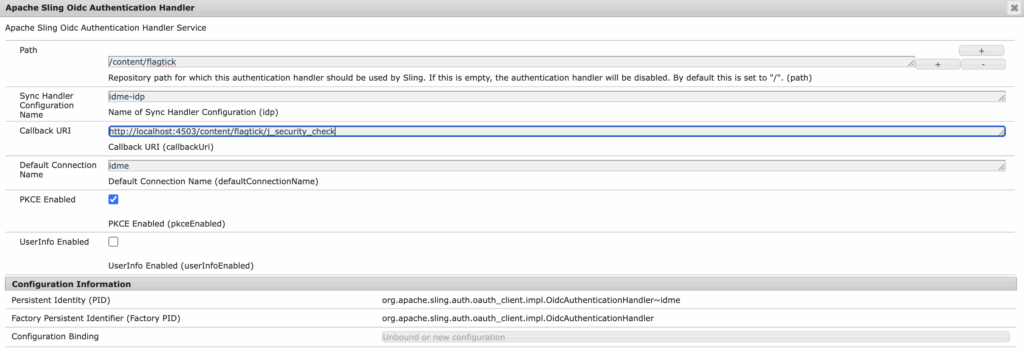
Saving any ~idme configuration restarts the OIDC component and rebinds dependencies; activation may fail if required services are missing or misconfigured.
During local development, tail Publish SDK logs to observe activation output and errors in real time:
$ tail -f crx-quickstart/logs/error.logAfter saving, use Components console to confirm all OIDC-related instances are in ACTIVE state before continuing with authentication testing.
When and Why AEM Sends Users to ID.me
This behavior depends on three layers working together: Dispatcher filters, Sling authentication requirements, and the OIDC authentication handler configuration.
Below illustrates a single protected path scenario:
// dispatcher/src/conf.dispatcher.d/filters/filters.any
/0225 { /type "allow" /url "/content/flagtick/us/en/dashboard/j_security_check" }

// org.apache.sling.engine.impl.auth.SlingAuthenticator.cfg.json
{
  "auth.anonymous": false,
  "sling.auth.requirements": [
    "+/content/flagtick/us/en/dashboard",
    ...
  ]
}

// org.apache.sling.auth.oauth_client.impl.OidcAuthenticationHandler~idme.cfg.json
{
  "callbackUri": ".../content/flagtick/us/en/dashboard/j_security_check",
  "path": [
    "/content/flagtick/us/en/dashboard"
  ],
  ...
}Instead of securing single page, these rules can apply to an entire site subtree:
// dispatcher/src/conf.dispatcher.d/filters/filters.any
/0225 { /type "allow" /url "/content/flagtick/**/j_security_check" }

// org.apache.sling.engine.impl.auth.SlingAuthenticator.cfg.json
{
  "auth.anonymous": false,
  "sling.auth.requirements": [
    "+/content/flagtick",
    ...
  ]
}

// org.apache.sling.auth.oauth_client.impl.OidcAuthenticationHandler~idme.cfg.json
{
  "callbackUri": ".../content/flagtick/us/en/dashboard/j_security_check",
  "path": [
    "/content/flagtick"
  ],
  ...
}Once these protections are in place, users can trigger OIDC authentication by attempting to access protected content directly:
// direct
https://<host>/content/flagtick/us/en/dashboard.html

// system login helper
https://<host>/system/sling/login?resource=/content/flagtick/us/en/dashboard.htmlAEM responds by generating authorization request to ID.me:
https://api.idmelabs.com/oauth/authorize
  ?scope=openid http://idmanagement.gov/ns/assurance/ial/2/aal/2
  &response_type=code
  &redirect_uri=https://<host>/content/flagtick/us/en/dashboard/j_security_check
  &state=...
  &code_challenge_method=S256
  &nonce=...
  &client_id={{client_id}}
&code_challenge={{pkce_value}}Before redirecting to ID.me, AEM initializes correlation parameters for the OIDC Authorization Code + PKCE flow, including state (request correlation and CSRF protection), nonce (token correlation), and code_verifier (PKCE).
These values are stored in browser context and later validated when ID.me returns control to AEM. Without this validation, AEM cannot confirm that callback belongs to the original authentication attempt.
Whether users complete Sign In or new Sign Up flow at ID.me, control must return to AEM. OpenID Connect requires the authorization server (ID.me) to deliver an authorization code back to the client through the registered redirect URI.
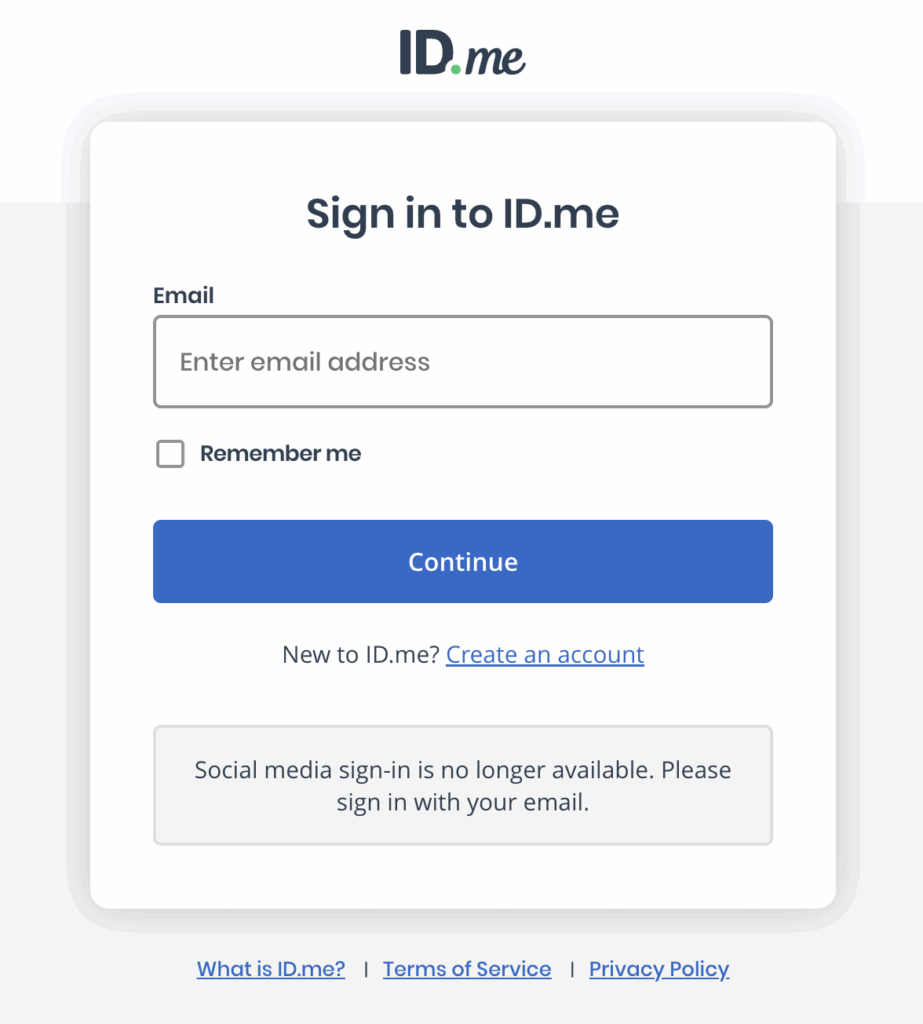
AEM then validates this callback, exchanges the code for tokens, and continues the authentication sequence.
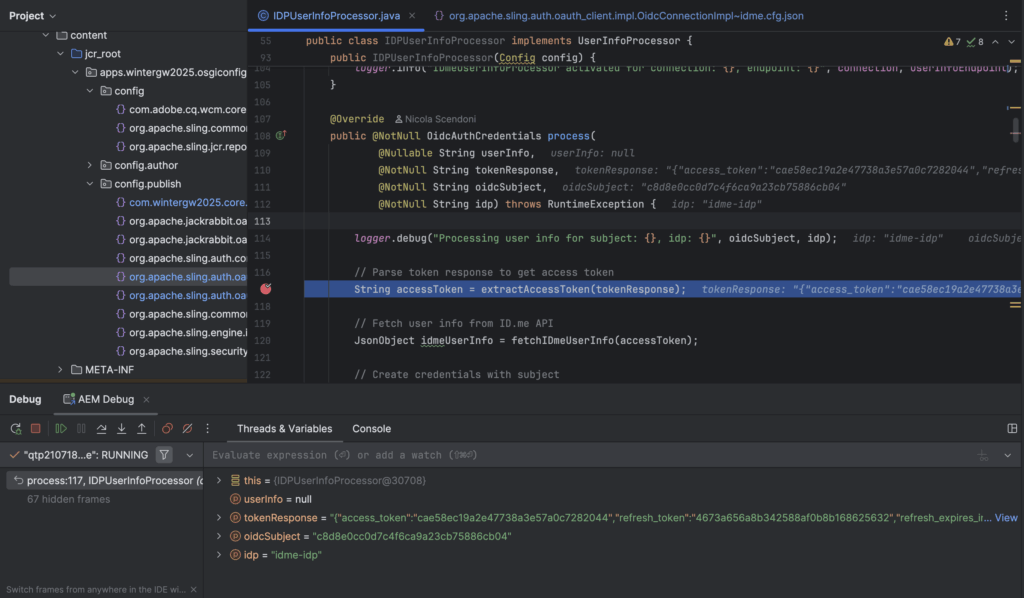
After ID.me completes verification, control returns to AEM via the callback to resume the OIDC flow. Debugging shows how this callback is handled inside AEM.
Google brower say: http://localhost:4503/content/flagtickWhen callback returns, control flows into IDPUserInfoProcessor, where token and user info processing takes place.
Once user info processing completes, the browser lands on protected content. Successful landing confirms that the redirect URI matched an existing resource and that authentication resolved without a 404. After session initialization, authenticated state applies to all protected pages under /content/flagtick/**, enabling consistent OIDC-based access control for downstream pages.
During debugging, if execution is paused for an extended period, the OIDC handler may throw a state validation error. This is expected behavior when cookies or temporary state values expire while waiting for the callback.
java.lang.IllegalStateException: Failed state check: No request cookie named sling.oauth-request-key found
	at org.apache.sling.auth.oauth_client.impl.OidcAuthenticationHandler.extractCookie(OidcAuthenticationHandler.java:414)
atThe browser was still waiting for the /j_security_check response, but the server thread was frozen under the debugger, preventing AEM from completing the callback flow.
This caused the temporary OIDC state cookie to expire or be cleaned up during the delay.
That cookie is named:
sling.oauth-request-keySling’s OIDC handler uses this cookie to validate request state and CSRF correlation between:
Step 1: /authorize → IDP
Step 2: callback → /j_security_checkWhen execution resumes after a long pause, the callback no longer contains valid state information, and the handler throws:
Failed state check: No request cookie named sling.oauth-request-key foundWith state validation failing, the authentication sequence terminates and returns HTTP 500. This failure occurs entirely within Sling’s OIDC handler, prior to any custom UserInfoProcessor or request logic running.
When OIDC authentication completes without error, AEM synchronizes external identity attributes and persists them under:
/home/users/idme/<uuid>/profileThese attributes can then be consumed by application code to personalize content, enforce entitlements, or populate dashboards—without re-contacting ID.me.
To prevent leaking identity data directly into Sling script bindings, it is recommended to expose a small service API that reads identity attributes from Oak and returns only the fields required by the application layer.
Below shows an example IDmeService abstraction that detects verified ID.me users and returns selected profile attributes from the AEM repository.
public interface IDmeService {
    boolean isVerifiedUser(SlingHttpServletRequest request);
    String getFullName(SlingHttpServletRequest request);
}In Servlets, the service can be injected as an OSGi reference:
@Reference
private IDmeService idmeService;Usage:
if (idmeService.isVerifiedUser(request)) {
    String name = identityService.getFullName(request);
    // personalize response or apply entitlement logic
}In Sling Models, inject using the @OSGiService annotation:
@OSGiService
private IDmeService idmeService;HTL components can then render personalized UI:
<h2>Hello, ${model.userName}!</h2>This pattern decouples identity storage from rendering concerns and allows business logic to reuse ID.me verification attributes across components, dashboards, and backend flows.
[REWRITE TO SMOOTHLY CONNECT WITH PRIOR AND FOLLOWING PARTS]